
Best Affordable Virtual Desktop Options for Freelancers
A virtual desktop is a secure environment that enables employees to work from any device while cutting infrastructure costs.
This technology moves the hardware and software processes to a cloud system rather than the local CPUs. Best affordable virtual desktop operating system can be located in a secure data center or on a normal machine anywhere. Applications, data, and operating systems are located on a server that is located at a distance and can be accessed from any device, which provides a local experience. Today in this blog we will discuss one of the best and most affordable virtual desktop solutions for freelancers, single users and small business holders. So let’s start with exploring the benefits of virtual desktops.
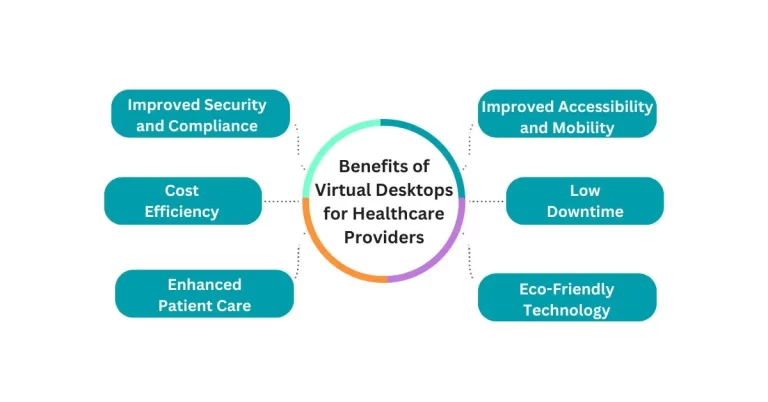
Benefits of best affordable Virtual Desktop Infrastructure
Cost Reduction:
Virtual desktop solutions greatly reduce infrastructure costs since resources are centralized.
Enhanced Security:
Centralizing data makes it easier to protect it and also guarantees that only the right people have access to it.
Efficient Management:
Hardware and software maintenance and management are centralized, which enhances the efficiency of operations.
Improved Productivity:
They improve efficiency by enabling effective remote working environments for these platforms.
Support for BYOD
Endorses using the Bring-Your-Own-Device approach, allowing employees to use their gadgets or devices securely.
Facilitated Collaboration:
Complements workflows in online video conferencing to improve virtual collaboration.
Affordable Virtual Desktop Options for Freelancers

V2 Cloud
It is easy to deploy a cloud-hosted virtual windows desktops, and it takes less than ten clicks to do so. This fully managed DaaS solution frees business owners and IT managers from extensive technical decisions and allows them to focus on core business activities.
At a considerably cheaper cost than its competitors, it provides scalable business services in the cloud while removing the need for expensive IT hardware or training to deploy virtual environments.
Strategic Features
- A fully outsourced managed desktop as a service solution
- Integrated security features
- Multi-user desktop support and dual monitor support
- Global data centers that guarantee high-speed performance
- Secure remote access
- Daily automated backups
- Built-in live support
- Multi-factor authentication
- Deployed on-premises applications as web applications
- Easy-to-use management console
Pricing
Three plans are available.
The three levels of service are Basic, Business and Enterprise. The basic plan costs $40 per month for one user, $70 per month for four users, and goes up to $1,120 per month for 64 users.

Affordable Virtual Desktop Options for Freelancers
1 – V2 Cloud
V2 Cloud is at 1 Position in our list of Affordable Virtual Desktop Options for Freelancers
Thinfinity Workspace
This is an enhanced, secure platform that follows the zero-trust model to provide secure and contextual access to corporate VDI, applications, SaaS, and files across Windows, Linux, or mainframes. It supports various deployment options, such as cloud, on-premises, and hybrid; and works with all cloud solutions. Its reverse gateway technology improves security by creating SSL-encrypted connections without the need for client-side installations, firewall changes, or inbound ports.
Features
- Secure Access with Universal ZTNA: Provide clients or clientless access to the corporate resources with end-to-end protection for all users.
- Virtual Desktops and Applications: Deliver virtual desktops or DaaS with automated capabilities, thereby minimizing the management overhead and expenses.
- Resource Management across Cloud or On-Premises: The Cloud Manager from Thinfinity provides a single point of administration for virtual resources.
Pricing
A free version and trial are available for this software.
There are several paid plans with customization depending on the needs of the client.

Affordable Virtual Desktop Options for Freelancers
2 – Thinfinity Workspace
Thinfinity Workspace is at 3 Position in our list of Affordable Virtual Desktop Options for Freelancers
Citrix DaaS
Citrix DaaS (previously known as Citrix Virtual Apps and Desktops) delivers a secure, high-performance digital work environment for flexible work arrangements. It enables desktops to be deployed as a service from any cloud or data center and provides organizations with flexibility to grow while maintaining data security.
It also accelerates virtual app and desktop delivery with trusted DaaS infrastructure for effective business continuity planning.
Basic Features
- Faster deployment of desktop and apps
- Support for both Windows and Linux applications
- Provide secure access to users irrespective of the location.
- The ability to be installed either on the company’s premises or on a cloud platform.
- Compatibility with any device
- Optimizing the use of Microsoft Teams in virtual settings
- Central management interface for large scale environments
- Configuration logging for change tracking
- Centralized image management
- Universal print server
Pricing
Depends on the contract agreements and the number of users.
One-year contract: $10.29/user/month
Three-year contract: $8.23/user/month
Monthly pricing starts at $12/user.
Affordable Virtual Desktop Options for Freelancers
3 – Citrix DaaS
Citrix DaaS is at 3 Position in our list of Affordable Virtual Desktop Options for Freelancers
Azure Virtual Desktop
It is the only VDI that has multi-session Windows 10, MS 365 Apps for enterprise, and RDS support. This solution allows for the quick provisioning and growth of Windows desktops and applications in minutes while including security and compliance features. It also enables businesses to take advantage of the multi-session feature of Windows 10 and 11 to allow multiple users at the same time.
Main Features
- Affordable solution that can be expanded, using eligible Windows licenses
- It is easy to deploy.
- Providing Windows 10 desktops and applications through virtual means across the world
- Integrated smart security measures
- Multiple user sessions support
- The management of the virtual environment is integrated.
- Remote app streaming features
- Two-factor authentication and the rights management system
Pricing
Pricing consists of two components: user access rights and Azure cost for the infrastructure required to host and manage the environment. One or three-year plans are 72% cheaper than pay-as-you-go pricing for businesses.
Affordable Virtual Desktop Options for Freelancers
4 – Azure Virtual Desktop
Azure Virtual Desktop is at 4 Position in our list of Affordable Virtual Desktop Options for Freelancers
Amazon WorkSpaces
It offers a completely administered and protected digital platform solution. It allows for the deployment of Windows or Linux-based desktops in minutes, and the capability to scale to thousands of desktops at a global level. A pay-as-you-go VDI approach helps businesses reduce their costs more than options like desktop and on-premise VDI solutions.
Its services help to reduce the difficulties of managing the hardware inventory, operating systems updates, patches and VDI. Users get responsive desktops for fast access to applications anytime and anywhere from multiple devices supported by the solution, which is critical for remote work of teams and contact centers.
Features
- Fully managed services that are designed for quick growth of the business.
- Available on Windows, Mac, Linux, Chrome OS, tablets, and supported browsers
- Data security through Amazon Virtual Private Cloud
- Flexible and affordable model of pricing based on usage
- Perfect for distributed workers and gig employees
- Encryption of storage volumes and having storage that is always available in the AWS cloud
Pricing
Pricing is determined by options like memory size and storage needs. For instance, the basic service package includes the 10GB user volume and 80GB root volume with 2GB memory for $21 monthly charges.
Affordable Virtual Desktop Options for Freelancers
5 –Amazon WorkSpaces
Amazon WorkSpaces is at 5 Position in our list of Affordable Virtual Desktop Options for Freelancers
Cloudbrink
Cloudbrink’s secure access service improves employee efficiency and satisfaction and guarantees high protection levels. This platform unveils a new generation of high-performance connectivity solutions for global hybrid workforces. Cloudbrink is a company that provides edge-native Hybrid Access as a Service (HAaaS) with the help of AI and ML technologies.
Cloudbrink’s software-only model includes the highest-performing ZTNA in the industry, with integrated personal SD-WAN and AMTD security. By deploying thousands of dynamic Points of Presence (PoPs), referred to as FAST (Flexible, Autonomous, Smart, Temporary) edges, the platform delivers an in-office user experience with a 30x improvement in application performance.
Main Features of Cloudbrink
- Zero-trust security: Adopts a zero-trust architecture that does not require any hardware.
- Hybrid Access as a Service (HAaaS): Ensures first-time right user adoption and rapid productivity for cloud, SaaS and data center solutions.
- Edge-native platform: Guarantees a superior quality of the user experience.
- Latency reduction: Reduces delay, thereby allowing users to be productive from any location of their choice.
- User and device authentication: It facilitates security for the authentication of users and also the devices.
- Device posture monitoring: It always provides the status of the device.
- AI-driven connection management: Adopts AI as a solution to network issues in an efficient manner.
- Automated Moving Target Defense (AMTD): Provides high-level security with dynamic security features.
- Rotating certificates: Includes certificate rotation to increase security as well.
- Provides end-to-end secure connections.
- Fast edges: Ad hoc creates temporary PoPs close to the end users to cater to varying demands.
- Connector software: Available as an installation in cloud environments or data centers.
Pricing
The service is offered on a subscription basis and costs $119.88 per year or roughly $10 per month if paid annually.
Affordable Virtual Desktop Options for Freelancers
6 –Cloudbrink
Cloudbrink is at 6 Position in our list of Affordable Virtual Desktop Options for Freelancers
Kamatera
Kamatera is an international cloud services provider that provides various cloud infrastructure services to various organizations.
Services or products offered by Kamatera are
- Cloud servers: Equipped with the latest processors for speed.
- Load balancers
- Block storage: Exploiting a centralized architecture for the secure management of data.
- Virtual Private Cloud (VPC): Offering a private and secure cloud solution.
- Cloud firewall: Protecting systems, people and data from cyber criminals and malicious software.
Basic Fundamental Features
- Upgrade or clone servers easily using a management console.
- Owns 13 data centers in 4 countries.
- It supports several Windows and Linux operating systems.
- Has fast processors and high-speed networking.
- Provides safe storage of data with an extra backup server.
- Coordinates software so that it can be used on several different remote desktops.
- All hosting plans come with SSD storage to ensure the speed.
- Enables easy administration and offers an administration console and API for MS Exchange management.
- It offers round-the-clock support, ensuring assistance is available 24/7.
- The platform has 24 data centers around the world.
- Kamatera targets startup companies, application developers, SMBs, and large global corporations as its clients.
- New users can have a 30-day trial and can have up to $100 worth of credits.
Pricing
Kamatera has a variety of pricing strategies; hourly, monthly, and scale-as-you-go.
Pricing depends on the operating system, storage, and traffic on the internet.
For instance, a public IP Windows 10 desktop with 20 GB storage is $13 per month, with hourly pricing as well. An excellent and affordable choice for freelancers and small business owners.
Affordable Virtual Desktop Options for Freelancers
7 –Kamatera
Kamatera is at 7 Position in our list of Affordable Virtual Desktop Options for Freelancers
Features to Look for in Virtual Desktop Solutions
When choosing a specific virtual desktop solution, one should look for elements that fit into organizational needs. Costs tend to vary depending on the hardware and software, the number of users likely to use it, and the need for security.
Universal Accessibility: Allow the use from any device, which will allow for work from home.
Administrative Controls: Make the process of adding new users/applications easier.
Secure Data Storage: Use the cloud storage for your important data for better security.
Advanced Security Measures: These are firewalls, end-to-end encryption and automatic backup that runs daily.
Distributed Data Centers: Promise faster access speeds by using many locations for data centers.
Support for Diverse Operating Systems: Works with Windows, iOS, Linux, and other systems.
Load Balancing: Ensure that the user workloads are well distributed among the host pools.
High Graphics Performance: Offer sufficient backing for graphic demanding programs.
User-Friendly Management Consoles: Provide easy to use interfaces for operating cloud environments.
Effortless Scalability: Simplify the deployment, management, and scaling of applications.
Dedicated Resources: Allocate exclusive resources for each server.
User Virtualization: Provide profile management features to personalize user experiences.
Final Arguments
In a digital world where freelancers are on the rise, and the world is becoming more and more connected, having a secure virtual desktop is a necessity. The options mentioned in this article from V2 Cloud to Amazon WorkSpaces allow freelancers to expand their business, protect their data, and increase efficiency without the high costs of infrastructure. Every solution has its advantages, starting with the unrivaled ability to scale and integrate top-notch security measures and ending with such features as AI-based connection management.
Choosing the right virtual desktop hinges on understanding your specific requirements; cost considerations, user capabilities, and requirements. When you adopt one of these virtual desktop solutions, you are not only buying a piece of technology, but you are equipping yourself to work with people across the globe, work from anywhere, and prepare for the future of freelancing.
Learn About VDI Virtual Desktop
FAQs
What is a virtual desktop and how does it work?
Virtual desktop is a means of virtualization that helps one to work in the operating system from different types of devices with a connection to the internet. The resources are stored on a server, which is located in a different location, which is safer and more convenient.
Can virtual desktops be beneficial for freelancers?
Of course, virtual desktops are ideal and very appropriate for freelancers because it is less costly to implement, flexible to work from any location, and protect the sensitive information of the clients more securely.
What is the cheapest virtual desktop solution?
Services such as V2 Cloud, Amazon WorkSpaces, and Kamatera are popular due to their low cost and the possibility to expand the services based on the needs of the client.
What does the pricing for virtual desktops usually look like?
Typically it is categorized by the number of users, storage volume, and other services and products. Most of the providers have different packages that allow the users to choose from, these include the per-use, monthly, and the custom packages.
Can virtual desktops run resource-intensive applications?
Yes, plenty of virtual desktop solutions are providing interactions of resource-hunger applications, including high graphical demanding applications, for instance, Azure Virtual Desktop and Cloudbrink.